Using dask.distributed as Parallel Pool Example
This example shows how you can use any parallel pool-executor like object to run combos - specifally the dask.distributed.Client.
%config InlineBackend.figure_formats = ['svg']
import numpy as np
from dask.distributed import Client

import xyzpy as xyz
First we instantiate the client:
address = None  # put in an actual address like '127.0.0.1:8786' if you have a scheduler running
c = Client(address=address)
c
Client
Client-a5c01656-2b14-11f1-b0ab-028aa0870bc6
| Connection method: Cluster object | Cluster type: distributed.LocalCluster |
| Dashboard: http://127.0.0.1:8787/status |
Cluster Info
LocalCluster
bfad87d4
| Dashboard: http://127.0.0.1:8787/status | Workers: 5 |
| Total threads: 10 | Total memory: 32.00 GiB |
| Status: running | Using processes: True |
Scheduler Info
Scheduler
Scheduler-bbb787eb-7944-4f51-8235-891aee28fdf3
| Comm: tcp://127.0.0.1:55507 | Workers: 0 |
| Dashboard: http://127.0.0.1:8787/status | Total threads: 0 |
| Started: Just now | Total memory: 0 B |
Workers
Worker: 0
| Comm: tcp://127.0.0.1:55523 | Total threads: 2 |
| Dashboard: http://127.0.0.1:55524/status | Memory: 6.40 GiB |
| Nanny: tcp://127.0.0.1:55510 | |
| Local directory: /var/folders/qg/9jgh3y7x2352yjf6l63gzhyc0000gn/T/dask-scratch-space/worker-5s22_cq1 | |
Worker: 1
| Comm: tcp://127.0.0.1:55520 | Total threads: 2 |
| Dashboard: http://127.0.0.1:55521/status | Memory: 6.40 GiB |
| Nanny: tcp://127.0.0.1:55512 | |
| Local directory: /var/folders/qg/9jgh3y7x2352yjf6l63gzhyc0000gn/T/dask-scratch-space/worker-d2l7t2jh | |
Worker: 2
| Comm: tcp://127.0.0.1:55526 | Total threads: 2 |
| Dashboard: http://127.0.0.1:55527/status | Memory: 6.40 GiB |
| Nanny: tcp://127.0.0.1:55514 | |
| Local directory: /var/folders/qg/9jgh3y7x2352yjf6l63gzhyc0000gn/T/dask-scratch-space/worker-d6gshrhb | |
Worker: 3
| Comm: tcp://127.0.0.1:55529 | Total threads: 2 |
| Dashboard: http://127.0.0.1:55530/status | Memory: 6.40 GiB |
| Nanny: tcp://127.0.0.1:55516 | |
| Local directory: /var/folders/qg/9jgh3y7x2352yjf6l63gzhyc0000gn/T/dask-scratch-space/worker-qcvsx1vj | |
Worker: 4
| Comm: tcp://127.0.0.1:55532 | Total threads: 2 |
| Dashboard: http://127.0.0.1:55533/status | Memory: 6.40 GiB |
| Nanny: tcp://127.0.0.1:55518 | |
| Local directory: /var/folders/qg/9jgh3y7x2352yjf6l63gzhyc0000gn/T/dask-scratch-space/worker-hzoz0v4z | |
The Client instance can act like a normal parallel pool since it has a submit method and returns futures:
c.submit
<bound method Client.submit of <Client: 'tcp://127.0.0.1:55507' processes=5 threads=10, memory=32.00 GiB>>
Let’s define our test function and combos:
def rad(x, y, n):
    r = (x**n + y**n) ** (1 / n)
    if r == 0.0:
        return 1
    return np.sin(r) / r


combos = {
    "x": np.linspace(-15, 15, 51),
    "y": np.linspace(-15, 15, 51),
    "n": [2, 4, 6],
}

r = xyz.Runner(rad, var_names="sinc2d")
Now we can run (or harvest, or grow_missing) our combos, supplying the Client instance to the executor= keyword:
r.run_combos(combos, executor=c)
100%|##########| 7803/7803 [00:10<00:00, 719.90it/s]
<xarray.Dataset> Size: 63kB
Dimensions:  (x: 51, y: 51, n: 3)
Coordinates:
  * x        (x) float64 408B -15.0 -14.4 -13.8 -13.2 ... 13.2 13.8 14.4 15.0
  * y        (y) float64 408B -15.0 -14.4 -13.8 -13.2 ... 13.2 13.8 14.4 15.0
  * n        (n) int64 24B 2 4 6
Data variables:
sinc2d (x, y, n) float64 62kB 0.03308 -0.04752 ... -0.04752 -0.05369That should take enough time to check out client status including the tasks being processed on for example: http://127.0.0.1:8787/tasks.
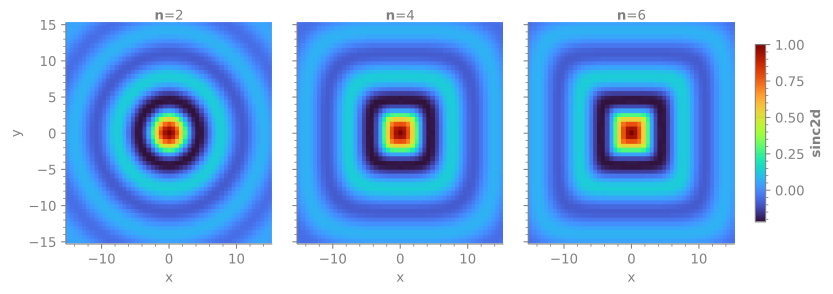
Finally, visualize the output:
r.last_ds.xyz.infiniplot("x", "y", z="sinc2d", col="n", palette="turbo")
(<Figure size 900x300 with 3 Axes>,
 array([[<Axes: xlabel='x', ylabel='y'>, <Axes: xlabel='x'>,
         <Axes: xlabel='x'>]], dtype=object))