Specifying Inputs & Outputs
The idea of xyzpy is to ease the some of the pain generating data with a large parameter space.
The central aim being that, once you know what a single run of a function looks like, it should be as easy as saying, “run these combinations of parameters, now run these particular cases” with everything automatically aggregated into a fully self-described dataset.
%config InlineBackend.figure_formats = ['svg']

import numpy as np

import xyzpy as xyz
Combos & Cases
The main backend function is xyz.combo_runner, which in its simplest form takes a function, say:
def foo(a, b, c):
    return f"{a}-{b}-{c}", np.sin(a)
and combos of the form:
combos = [
    ("a", [1, 2, 3]),
    ("b", ["x", "y", "z"]),
    ("c", [True, False]),
]
and generates a nested (here 3 dimensional) array of all the outputs of foo with the 3 * 3 * 2 = 18 combinations of input arguments:
xyz.combo_runner(foo, combos)
100%|##########| 18/18 [00:00<00:00, 56090.25it/s]
(((('1-x-True', np.float64(0.8414709848078965)),
   ('1-x-False', np.float64(0.8414709848078965))),
  (('1-y-True', np.float64(0.8414709848078965)),
   ('1-y-False', np.float64(0.8414709848078965))),
  (('1-z-True', np.float64(0.8414709848078965)),
   ('1-z-False', np.float64(0.8414709848078965)))),
 ((('2-x-True', np.float64(0.9092974268256817)),
   ('2-x-False', np.float64(0.9092974268256817))),
  (('2-y-True', np.float64(0.9092974268256817)),
   ('2-y-False', np.float64(0.9092974268256817))),
  (('2-z-True', np.float64(0.9092974268256817)),
   ('2-z-False', np.float64(0.9092974268256817)))),
 ((('3-x-True', np.float64(0.1411200080598672)),
   ('3-x-False', np.float64(0.1411200080598672))),
  (('3-y-True', np.float64(0.1411200080598672)),
   ('3-y-False', np.float64(0.1411200080598672))),
  (('3-z-True', np.float64(0.1411200080598672)),
   ('3-z-False', np.float64(0.1411200080598672)))))
Note the progress bar shown. If the function was slower (generally the target case for xyzpy), this would show the remaining time before completion.
There is also xyz.case_runner for running isolated cases:
cases = [(4, "z", False), (5, "y", True)]
xyz.case_runner(foo, fn_args=("a", "b", "c"), cases=cases)
100%|##########| 2/2 [00:00<00:00, 22982.49it/s]
(('4-z-False', np.float64(-0.7568024953079283)),
 ('5-y-True', np.float64(-0.9589242746631385)))
You can also mix the two, supplying some function arguments as cases and some as combos.
In this situation, for each case, all sub combinations are run:
xyz.combo_runner(
    foo,
    cases=[
        {"a": 1, "c": True},
        {"a": 2, "c": False},
        {"a": 3, "c": True},
    ],
    combos={
        "b": ["x", "y", "z"],
    },
)
100%|##########| 9/9 [00:00<00:00, 97541.95it/s]
((((array(nan), array(nan)),
   (array(nan), array(nan)),
   (array(nan), array(nan))),
  (('1-x-True', np.float64(0.8414709848078965)),
   ('1-y-True', np.float64(0.8414709848078965)),
   ('1-z-True', np.float64(0.8414709848078965)))),
 ((('2-x-False', np.float64(0.9092974268256817)),
   ('2-y-False', np.float64(0.9092974268256817)),
   ('2-z-False', np.float64(0.9092974268256817))),
  ((array(nan), array(nan)),
   (array(nan), array(nan)),
   (array(nan), array(nan)))),
 (((array(nan), array(nan)),
   (array(nan), array(nan)),
   (array(nan), array(nan))),
  (('3-x-True', np.float64(0.1411200080598672)),
   ('3-y-True', np.float64(0.1411200080598672)),
   ('3-z-True', np.float64(0.1411200080598672)))))
Note now that for the combo_runner missing results are automatically filled with nan, (or possibly None depending on shape and dtype).
Note we also avoided specifying the specific function argument order by supplying a list of dicts.
You can supply both combos and cases to either combo_runner, or case_runner, the main difference is
combo_runneroutputs a nested tuple suitable to be turned into an arraycase_runneroutputs a flat tuple of results suitable to be put into a table
You will likely not use these functions in their raw form, but they illustrate the concept of combos and cases and underly most other functionality.
Describing the function - Runner
To automatically put the generated data into a labelled xarray.Dataset you need to describe your function using the xyz.Runner class. In the simplest case this is just a matter of naming the outputs:
runner = xyz.Runner(foo, var_names=["a_out", "b_out"])
runner.run_combos(combos)
100%|##########| 18/18 [00:00<00:00, 67650.06it/s]
<xarray.Dataset> Size: 830B
Dimensions:  (a: 3, b: 3, c: 2)
Coordinates:
  * a        (a) int64 24B 1 2 3
  * b        (b) <U1 12B 'x' 'y' 'z'
  * c        (c) bool 2B True False
Data variables:
    a_out    (a, b, c) <U9 648B '1-x-True' '1-x-False' ... '3-z-False'
b_out (a, b, c) float64 144B 0.8415 0.8415 0.8415 ... 0.1411 0.1411The output dataset is also stored in runner.last_ds and, as can be seen, is completely labelled - see xarray for details of the myriad functionality this allows. See also the Basic Output Example for a more complete example.
Hint
As a convenience, xyz.label can be used to decorate a function, turning it directly into a Runner like so:
@label(var_names=['sum', 'diff'])
def foo(x, y):
    return x + y, x - y
Various other arguments to Runner allow: 1) constant arguments to be specified, 2) for each variable to have its own dimensions and 3) to specify the coordinates of those dimensions.
For example, imagine we have a function bar with signature:
"bar(i, j, k, t) -> (A, B[x], C[x, t])"
Maybe i, j, k index a location and t is a (constant) series of times to compute. There are 3 outputs: (i) the scalar A, (ii) the vector B which has a dimension x with known coordinates, say [10, 20, 30], and (iii) the 2D-array C, which shares the x dimension but also depends on t. The arguments to Runner to describe this situation would be:
var_names = ["A", "B", "C"]
var_dims = {"B": ["x"], "C": ["x", "t"]}
var_coords = {"x": [10, 20, 30]}
constants = {"t": np.linspace(0, 1, 101)}
Note that 't' doesn’t need to be specified in var_coords as it can be found in constants. Let’s explicitly mock a function with this signature and some combos to run:
def bar(i, j, k, t):
    A = np.random.rand()
    B = np.random.rand(3)  # 'B[x]'
    C = np.random.rand(3, len(t))  # 'C[x, t]'
    return A, B, C


# if we are using a runner, combos can be supplied as a dict
combos = {
    "i": [5, 6, 7],
    "j": [0.5, 0.6, 0.7],
    "k": [0.05, 0.06, 0.07],
}
We can then run the combos:
r = xyz.Runner(
    bar,
    constants=constants,
    var_names=var_names,
    var_coords=var_coords,
    var_dims=var_dims,
)
r.run_combos(combos)
100%|##########| 27/27 [00:00<00:00, 6761.78it/s]
<xarray.Dataset> Size: 67kB
Dimensions:  (i: 3, j: 3, k: 3, x: 3, t: 101)
Coordinates:
  * i        (i) int64 24B 5 6 7
  * j        (j) float64 24B 0.5 0.6 0.7
  * k        (k) float64 24B 0.05 0.06 0.07
  * x        (x) int64 24B 10 20 30
  * t        (t) float64 808B 0.0 0.01 0.02 0.03 0.04 ... 0.97 0.98 0.99 1.0
Data variables:
    A        (i, j, k) float64 216B 0.3676 0.9331 0.4158 ... 0.3203 0.2549
    B        (i, j, k, x) float64 648B 0.6944 0.08939 0.137 ... 0.9456 0.3549
C (i, j, k, x, t) float64 65kB 0.8575 0.05207 ... 0.8448 0.08909We can see the dimensions 'i', 'j' and 'k' have been generated by the combos for all variables, as well as the ‘internal’ dimensions 'x' and 't' only for 'B' and 'C'.
See also the :ref:Structured Output with Julia Set Example for a fuller demonstration.
Finally, if the function itself returns a dict or xarray.Dataset, then just use var_names=None and all the outputs will be concatenated together automatically. The overhead this incurs is often negligible for anything but very fast functions.
Aggregating data - Harvester
A common scenario when running simulations is the following:
Generate some data
Save it to disk
Generate a different set of data (maybe after analysis of the first set)
Load the old data
Merge the new data with the old data
Save the new combined data
Repeat
The aim of the Harvester is to automate that process. A Harvester is instantiated with a Runner instance and, optionally, a data_name. If a data_name is given, then every time a round of combos/cases is generated, it will be automatically synced with a on-disk dataset of that name. Either way, the harvester will aggregate all runs into the full_ds attribute.
combos = [
    ("a", [1, 2, 3]),
    ("b", ["x", "y", "z"]),
    ("c", [True, False]),
]

harvester = xyz.Harvester(runner, data_name="foo.h5")
harvester.harvest_combos(combos)
100%|##########| 18/18 [00:00<00:00, 141646.29it/s]
Which, because it didn’t exist yet, created the file data_name:
!ls *.h5
foo.h5
xyzpy.Harvester.harvest_combos() calls xyzpy.Runner.run_combos() itself - this doesn’t need to be done seperately.
Now we can run a second set of different combos:
combos2 = {
    "a": [4, 5, 6],
    "b": ["w", "v"],
    "c": [True, False],
}
harvester.harvest_combos(combos2)
100%|##########| 12/12 [00:00<00:00, 33599.23it/s]
Now we can check the total dataset containing all combos and cases run so far:
harvester.full_ds
<xarray.Dataset> Size: 1kB
Dimensions:  (a: 6, b: 5, c: 2)
Coordinates:
  * a        (a) int64 48B 1 2 3 4 5 6
  * b        (b) <U1 20B 'v' 'w' 'x' 'y' 'z'
  * c        (c) bool 2B True False
Data variables:
    a_out    (a, b, c) object 480B nan nan nan nan ... nan nan nan nan
b_out (a, b, c) float64 480B nan nan nan nan 0.8415 ... nan nan nan nan@xyz.label(var_names=["sum", "diff"], harvester="foo.h5")
def foo(x, y):
return x + y, x - y
foo
<xyzpy.Harvester>
Runner: <xyzpy.Runner>
    fn: <function foo at 0x30c887480>
    fn_args: ('x', 'y')
    var_names: ('sum', 'diff')
    var_dims: {'sum': (), 'diff': ()}
Sync file -->
    foo.h5    [h5netcdf]
Note that, since the different runs were disjoint, missing values have automatically been filled in with nan values - see xarray.merge(). The on-disk dataset now contains both runs.
Hint
As a convenience, label() can also be used to decorate a function as a xyzpy.Harvester
by supplying the harvester kwarg. If True a harvester will be instantiated with data_name=None.
If a string, it is used as the data_name.
>>> @label(var_names=['sum', 'diff'], harvester='foo.h5')
... def foo(x, y):
...     return x + y, x - y
...
>>> foo
<xyzpy.Harvester>
Runner: <xyzpy.Runner>
    fn: <function foo at 0x7f6217a2b550>
    fn_args: ('x', 'y')
    var_names: ('sum', 'diff')
    var_dims: {'sum': (), 'diff': ()}
Sync file -->
    foo.h5    [h5netcdf]
Aggregating Random samples of data - Sampler
Occasionally, exhaustively iterating through all combinations of arguments is unneccesary. If instead you just want to sample the parameter space sparsely then the Sampler object allows this with much the same interface as a Harvester. The main difference is that, since the parameters are no longer gridded, the data is stored as a table in a
pandas.DataFrame.
import math
import random


@xyz.label(var_names=["out"])
def trig(amp, fn, x, phase):
    return amp * getattr(math, fn)(x - phase)


# these are the default combos/distributions to sample from
default_combos = {
    "amp": [1, 2, 3],
    "fn": ["cos", "sin"],
    # for distributions we can supply callables
    "x": lambda: 2 * math.pi * random.random(),
    "phase": lambda: random.gauss(0.0, 0.1),
}

sampler = xyz.Sampler(trig, "trig.pkl", default_combos)
sampler
<xyzpy.Sampler>
Runner: <xyzpy.Runner>
    fn: <function trig at 0x30c886fb0>
    fn_args: ('amp', 'fn', 'x', 'phase')
    var_names: ('out',)
    var_dims: {'out': ()}
Sync file -->
    trig.pkl    [pickle]
Now we can run the sampler many times (and supply any of the usual arguments such as parallel=True etc). This generates a pandas.DataFrame:
sampler.sample_combos(10000);
100%|##########| 10000/10000 [00:00<00:00, 1517695.76it/s]
This has also synced the data with the on-disk file:
!ls *.pkl
trig.pkl
You can specify Sampler(..., engine='csv') etc to use formats other than pickle.
As with the Harvester, next time we run combinations, the data is automatically
aggregated into the full set:
# here we will override some of the default sampling choices
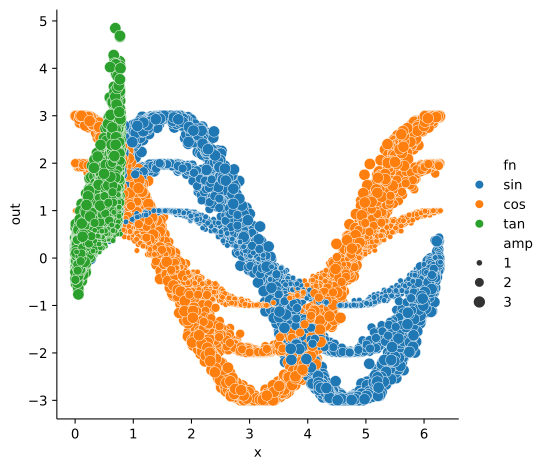
combos = {"fn": ["tan"], "x": lambda: random.random() * math.pi / 4}

sampler.sample_combos(5000, combos);
100%|##########| 5000/5000 [00:00<00:00, 1363912.59it/s]
We can then use tools such as seaborn to visualize the full data:
import seaborn as sns

sns.relplot(x="x", y="out", hue="fn", size="amp", data=sampler.full_df)
<seaborn.axisgrid.FacetGrid at 0x35a403cb0>
Hint
As a convenience, xyzpy.label() can also be used to decorate a function as a xyzpy.Sampler
by supplying the sampler kwarg. If True a sampler will be instantiated with data_name=None.
If a string, it is used as the data_name.
Summary
combo_runner()is the core function which outputs a nested tuple and contains the parallelization logic and progress display etc.Runnerandrun_combos()are used to describe the function’s output and perform a single set of runs yielding axarray.Dataset. These internally callcombo_runner().Harvesterandharvest_combos()are used to perform many sets of runs, continuously merging the results into one largerxarray.Dataset-Harvester.full_ds, probably synced to disk. These internally callrun_combos().Samplerandsample_combos()are used to sparsely sample from parameter combinations. Unlike a normalHarvester, the data is aggregated automatically into apandas.DataFrame.
In general, you would only generate data with one of these methods at once - see the full demonstrations in Examples.
# some cleanup
harvester.delete_ds()
sampler.delete_df()