Utilities
xyzpy provides a number of utilities that might be generally
useful when generating data. These are:
Timerbenchmark()Benchmarker
For timing and comparing functions. And then:
RunningStatisticsestimate_from_repeats()
for collecting running statistics and estimating quantities from repeats.
%config InlineBackend.figure_formats = ['svg']

import numpy as np

import xyzpy as xyz
Timing
Simple timing with Timer
This is a super simple context manager for very roughly timing a statement that runs once:
with xyz.Timer() as timer:
    A = np.random.randn(512, 512)
    el, ev = np.linalg.eig(A)

timer.interval
0.27247190475463867
If you run this a few times you might notice some big fluctuations.
Advanced timing with benchmark
This is a more advanced and accurate function that wraps timeit under the hood.
If offers however a convenient interface that accepts callables and sensibly manages
how many repeats to do etc.:
def setup(n=512):
    return np.random.randn(n, n)


def foo(A):
    return np.linalg.eig(A)


xyz.benchmark(foo, setup=setup)
0.16060145798837766
Or we can specfic the size n to benchmark with as well:
xyz.benchmark(foo, setup=setup, n=1024)
0.786840959044639
Which is calling foo(setup(n)) under the hood.
Generally the setup and n arguments are optional -
including them or not allows switching between the following
underlying patterns:
foo()
foo(n)
foo(setup())
foo(setup(n))
Supply starmap=True if you want foo(*setup(n)), and
see benchmark() for other options, e.g. the
minimum time and number of repeats to aim for.
For functions that launch asynchronous PyTorch CUDA work, enable synchronization of the current CUDA device at each timing boundary:
xyz.benchmark(fn, setup=setup, torch_cuda_sync=True)
Comparing performance with Benchmarker
Building on top of benchmark() and combining it with
the functionality of a Harvester() gives us a very nice
way to compare the performance of various functions, or ‘kernels’.
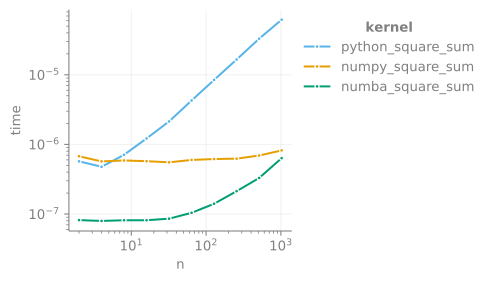
As an example here we’ll compare python, numpy and numba
for computing sum(x**2)**0.5.
import numba as nb


def setup(n):
    return np.random.randn(n)


def python_square_sum(xs):
    y = 0.0
    for x in xs:
        y += x**2
    return y**0.5


def numpy_square_sum(xs):
    return (xs**2).sum() ** 0.5


@nb.njit
def numba_square_sum(xs):
    y = 0.0
    for x in xs:
        y += x**2
    return y**0.5
The setup function will be supplied to each, we can check they
first give the same answer:
xs = setup(100)
python_square_sum(xs)
np.float64(9.97523320851365)
numpy_square_sum(xs)
np.float64(9.97523320851365)
numba_square_sum(xs)
9.97523320851365
Then we can set up a Benchmarker object to compare these with:
kernels = [
    python_square_sum,
    numpy_square_sum,
    numba_square_sum,
]

benchmarker = xyz.Benchmarker(
    kernels, setup=setup, benchmark_opts={"min_t": 0.01}
)
Next we run a set of problem sizes:
sizes = [2**i for i in range(1, 11)]

benchmarker.run(sizes, verbosity=2)
100%|##########| 30/30 [00:01<00:00, 21.85it/s, {'n': 1024, 'kernel': 'numba_square_sum'}]
Which we can then automatically plot:
benchmarker.plot()
(<Figure size 300x300 with 1 Axes>,
 array([[<Axes: xlabel='n', ylabel='time'>]], dtype=object))
Under the hood Benchmarker collects and aggregates results
using a Harvester. This means that subsequent runs
of different sizes will be automatically merged. Additionally, if you
initialize the benchmarker with a dataname, the results will be
stored in a on-disk dataset.
Estimation
Efficiently collect running statistics
Sometimes it is convenient to collect statistics on-the-fly, rather than storing
all the values and computing statistics afterwards. The
RunningStatistics object can be used for this purpose:
import random

stats = xyz.RunningStatistics()
total = 0.0

# don't know how many `x` we'll generate, and won't keep them
while total < 100:
    x = random.random()
    total += x

    stats.update(x)
We can now check a variety of information about the values generated:
print("             Count: {}".format(stats.count))
print("              Mean: {}".format(stats.mean))
print("          Variance: {}".format(stats.var))
print("Standard Deviation: {}".format(stats.std))
print(" Error on the mean: {}".format(stats.err))
print("    Relative Error: {}".format(stats.rel_err))
             Count: 207
              Mean: 0.48428927341941447
          Variance: 0.07836627923673178
Standard Deviation: 0.27993977787504903
 Error on the mean: 0.019457159584961168
    Relative Error: 0.04017673042308015
For performance, RunningStatistics is a numba compiled class,
and can also be updated using an iterable very efficiently:
xs = (random.random() for _ in range(10000))
stats.update_from_it(xs)
stats.count
10207
The relative error should now be much smaller:
stats.rel_err
0.005704083543763922
Estimating Repeat Quantities
Another common scenario is when you have a function that returns
a noisy estimate, which you would like to estimate to some
relative error. The function estimate_from_repeats()
provides this functionality, building on RunningStatistics.
As an example, imagine we want to estimate the sum of n uniformly distributed
numbers to a relative error of 0.1%:
def rand_n_sum(n):
    return np.random.rand(n).sum()


stats = xyz.estimate_from_repeats(rand_n_sum, n=1000, rtol=0.0001, verbosity=1)
32432it [00:00, 285928.59it/s]
RunningStatistics(mean=5.00007(50)e+02, count=32433)
We can then query the returned RunningStatistics object:
stats.mean
np.float64(500.00662606906917)
stats.rel_err
np.float64(0.00010019919813211347)
Which looks as expected.